Gate security that actually screens threats.
Visitor check-ins screened against configured BOLO and trespass records. Access decisions are recorded, residents can pre-register guests from their phone, and admins can review gate activity.
Run Arcova alongside your current system for 30 days before you commit. We will plan the side-by-side trial with you.
Operating record
Attaches here
Shift cell
Clock-in
Time entry
Invoice line
Payout
What residents see and report is drawn from the field records the shift already produced.
See the whole chainInside the platform
Every screen, built for a specific job.
An operational workstation, not a visitor list.
Guards can review the information needed for an access decision from one screen. Search residents, vendors, and visitors, review BOLO alerts and shift activity, then check in, deny, or escalate with a recorded decision.
- Live search across all community entities
- BOLO and trespasser alerts on the dashboard
- Visitor check-in/out with walk-in registration
- Shift stats — denials, check-ins, violations, incidents
Pre-registered, walked in, or denied — keep the decision recorded.
Residents pre-register guests with a pass code. Guards can check them in or register a walk-in. Check-in details are screened against configured active BOLO and trespass records, and the access decision is recorded.
- Pass code verification at the gate
- Walk-in registration from the guard view
- Screening against configured BOLOs and bans
- Host resident arrival notification
BOLOs and trespassers flagged before they get through the gate.
Create trespasser records with photos and structured name fields. During check-in, the system screens the visitor against those records. Possible matches show an alert for guard review before an access decision.
Automatic screening at check-in.
Arcova checks visitors against the configured records and shows possible matches for guard review before access is granted.
A shared view of recorded gate activity.
Property managers and board admins can review visitor logs, access patterns, incidents, violations, and vendor activity. They can bulk import residents from Excel and export access logs for board review.
- Real-time dashboard with security status
- Access logs with daily views and CSV export
- Resident, unit, vehicle, vendor management
- Bulk import from a single Excel workbook
Review what happened at the gate from a searchable record.
Every entry, exit, and denial logged with the guard on duty, the gate, timestamp, visitor details, and the access decision. Daily views, search, and CSV export for board meetings and compliance reporting.
- Every entry and denial timestamped
- Guard, gate, and visitor details captured
- Daily summaries for board reporting
- CSV export for compliance audits
Keep community records in one managed directory.
Residents, units, vehicles, and vendors can be managed from one directory. A single Excel workbook supports bulk import with preflight validation; onboarding time depends on data quality, gate configuration, and scope.
- Single Excel workbook bulk import
- Residents linked to units and vehicles
- Vendor approval with employee tracking
- Account creation with welcome emails
Three portals, one platform
Every role gets exactly what they need.
Guard Portal
Make access decisions from one focused view.
- BOLO & trespasser auto-screening
- Cross-entity person search
- Visitor check-in/out & walk-ins
- Incident & violation reporting
- Shift journal & guard handoff
- Entity notes shared across shifts
Resident Portal
Two taps. Guest registered. Done.
- Visitor pre-registration with pass codes
- Vehicle registration & management
- Guest arrival notifications
- Violation acknowledgement & dispute
- Household member management
- One-tap gate phone call
Admin Portal
Review community access and security activity.
- Real-time security dashboard
- Resident, unit, vehicle, vendor CRUD
- Bulk import with Excel templates
- Access logs & daily reporting
- Vendor approval workflows
- Incident & violation lifecycle
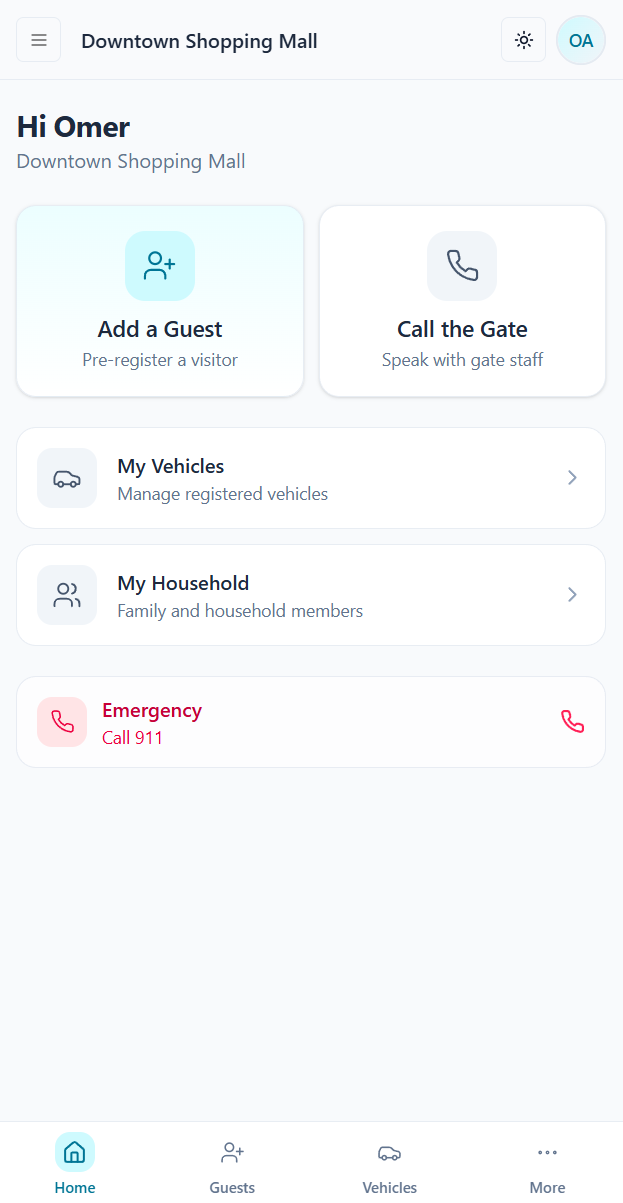
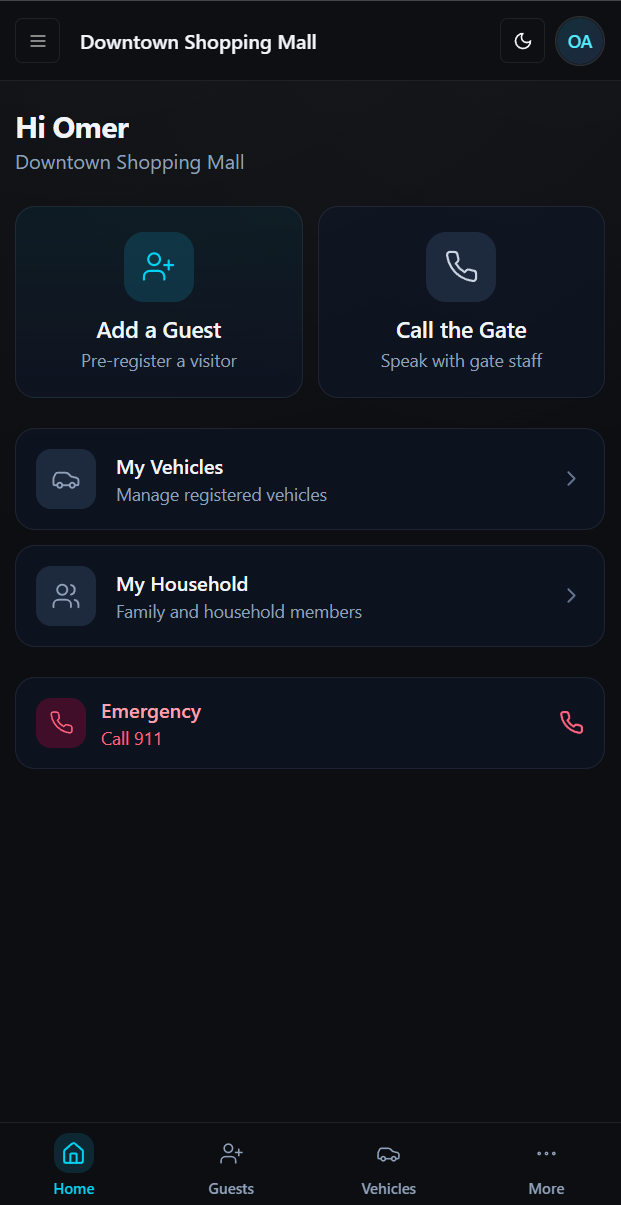
Resident mobile experience
Two buttons above the fold. That's it.
Residents want to add a guest or call the gate without navigating an operations dashboard. The browser-based mobile experience uses large touch targets and focused actions without requiring an app download.
- "Add a Guest" and "Call the Gate" — above the fold, always
- Vehicle registration and household management one tap away
- Guest arrival notifications pushed to their phone
- Works in any mobile browser — no app store required
- Emergency 911 button always accessible
How it works
Visitor arrival to a recorded access decision.
Visitor arrives at the gate
Guard opens the check-in screen. Pre-registered visitors give their pass code. Walk-ins are registered on the spot.
Guard captures identity
Name, vehicle, and purpose are entered. The system screens the visitor against the property watch list.
Threats surfaced before entry
A possible match surfaces an alert with the available BOLO photo and details for guard review before an access decision.
Access decision recorded
The visit is timestamped with the guard, gate, and unit, then made available in the relevant access, admin, and resident views.
Connected community security
Visitor, guard, resident, and admin workflows in one layer.
Keep access decisions, threat records, shift handoffs, directories, and vendor workflows connected.
BOLO screening
Check-in details are screened against configured active trespass and BOLO records, with available photos included in alerts.
Cross-entity person intel
One search returns resident, visitor, vendor, BOLO, ban status, and vehicle data.
Guard shift journal
Persistent notes between shifts. The next guard reads the journal before going on post.
Entity notes
Guards, admins, and staff add notes to any person or vendor. Notes visible across all roles.
Vendor lifecycle
Approval workflows, employee tracking, insurance monitoring, and scheduled access windows.
Bulk onboarding
Single Excel workbook imports residents, units, vehicles, and vendors. Preflight validation catches errors.
Before & after
What changes when the workflow is configured.
Visitor screening
Guard calls the unit. BOLOs checked from memory.
Watch-list screening at check-in.
Access records
Paper logs. Audits mean searching binders.
Searchable, exportable digital access history.
Guest registration
Residents call the gate. Guards forget.
Residents register guests online. Guards see them before arrival.
Admin visibility
Incident reports on paper. Maybe.
Real-time dashboard. Access logs. Exportable reports.
Shift handoff
Verbal briefing. Intel lost between shifts.
Digital journal. Persistent notes. BOLO board.
Partner availability
Get Community Portal through your security provider.
Availability, onboarding, and pricing are handled through your security provider.
Residents
Self-service visitor pre-registration and access history.
Guards
Gate workflow, BOLO screening, shift journal, and handoff tools.
Admins
Community reporting, resident directory, vendors, and audit review.
Partners
Packaged by the security company that manages the site.
Contact your Arcova partner security company about Community Portal.
They can confirm availability and next steps.
Questions
What devices do we need?
Arcova is browser-based. Guards and residents need supported devices and network access; confirm gate peripherals and device requirements during onboarding.
Can we keep our existing security company?
Yes. Guards can use the browser-based portal. If the provider also uses Arcova workforce management, confirm the connected workflow in the Order Form.
How fast is onboarding?
Timing depends on directory quality, gate configuration, devices, training, and the agreed rollout scope. Bulk import and preflight checks help prepare the data.
Multiple gates?
Supported configurations can give each gate a guard workstation and bring recorded access activity into a shared dashboard and audit history.
Is a parallel validation run available?
Run Arcova alongside your current system for 30 days before you commit. We will plan the side-by-side trial with you.
How is data protected?
Arcova supports encryption, role-based access, audit history, and optional guard-portal IP restrictions. Confirm the controls required for your deployment during security review.
See how your community security runs in Arcova.
Show us your property. We'll show you the guard portal, resident portal, and admin tools working together — with your community's data.
Run Arcova alongside your current system for 30 days before you commit. We will plan the side-by-side trial with you.